A good business outcome is the result of good planning. And when you have hundreds of things to manage, having a good planning tool is inevitable – not just to manage customer projects but also your day-to-day operations. Microsoft D365 for Finance and Operations master planning module enables you to efficiently manage all of your projects –set up and run the scheduling feature, calculate requirements and generate planned orders.
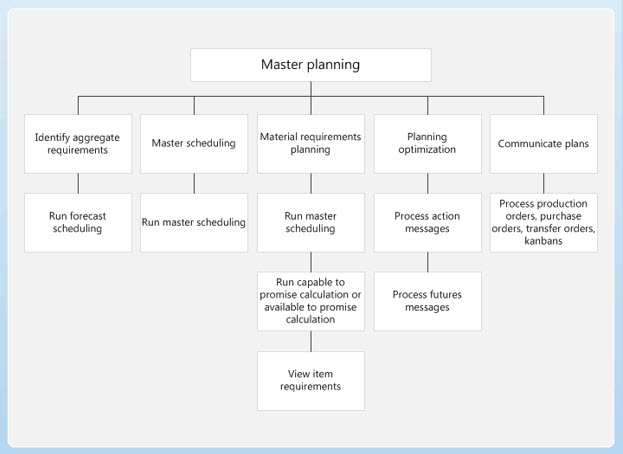
Dynamics AX offers a variety of master plans to support your company’s daily working operations. You can configure various plans on the Master Plans page, simulate different planning strategies, implement company policies, and manage a range of day-to-day tasks.
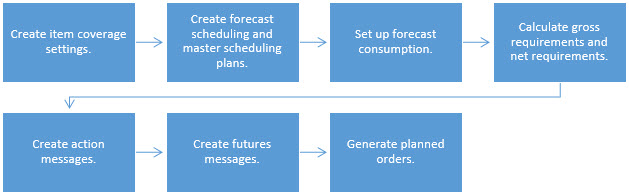
- Forecast Scheduling:
Want to efficiently manage your forecasts? With forecast scheduling, you can calculate gross requirements based on forecasts and perform long-term planning of materials and capacity. - Master Scheduling:
Looking at carrying out planning based on actual orders? With master scheduling, you can calculate net requirements based on actual orders and control inventory replenishment on a day-to-day basis. - Static Planning:
If you want to create an operating plan that your company personnel can use to base their decisions on and perform their daily tasks and activities, then the static plan is what you need. Using current data, you can generate a net requirements plan that remains unchanged until the next time you run master planning. - Dynamic Planning:
If you want to continuously monitor the changing order network and item availability without disturbing the static plan that others are using for their work processes, you can use the dynamic plan. This plan starts with the same net requirements; however, you can update the dynamic plan every time the master data changes – say when you create a new sales order, for example.
You can choose to work with just a dynamic plan or you can use both static and dynamic plans. The point is, you can configure any master plan to reflect a particular strategy or address an issue: from setting higher inventory levels to ensure optimum stock, to configuring extended safety margins to safeguard against erratic vendors. You can also ensure that your dynamic plan is always updated with the new requirements plan every time you run master planning.
Configuring the Master Planning Module
The master planning module allows you to set up and run the scheduling feature to calculate requirements and generate planned orders. Calculate gross requirements based on forecasts, carry out long-term planning of materials and capacity, calculate net requirements based on actual orders, and control inventory replenishment on a day-to-day basis. In order to configure the master planning module, you need to:
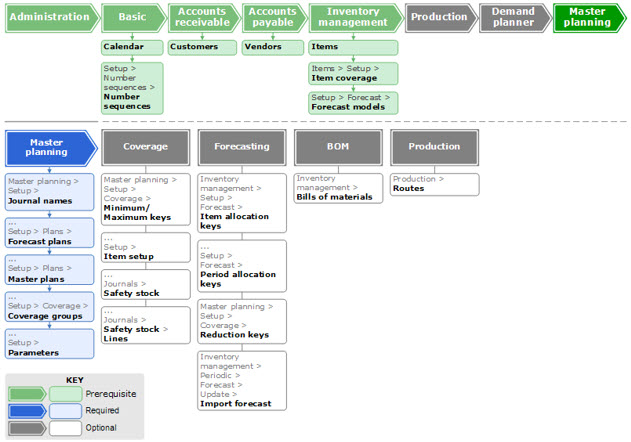
- Create safety stock journal names and set up basic rules
- Create forecast plans and specify parameters
- Create and manage master plans in the master plans form
- Create coverage groups and set up parameters
Pre-requisites
Before configuring the master planning module, you must set up:
- The administration module
- Calendar and Number sequences form in the basic module
- Customers form in accounts receivable
- Vendors form in accounts payable
- Item details, item coverage, and forecast models in the inventory management module.
About Ravish Kazi
Ravish have over 18 years of experience in Business Solutions, Plant Management, Production Management, SIO Planning, Warehouse Operations, Supply chain Management, Project Planning & Control, Production Planning, Material Management, Demand Planning in Manufacturing Environment, He is Detail-oriented and highly articulate professional, directing operations and activities within production area – Employs strong organizational skills, leadership and thorough knowledge regarding many aspects of the production process to achieve organization goals: MRP, MSP, Forecasting, cost estimates, cost-savings, product quality, labor efficiency, timely delivery and safety. Excellent hands on experience in Implementing Microsoft Dynamics D365/AX ERP System via Scrum framework and through understanding of Inventory Management, Advanced Warehouse Management, Production Control, Project Management & Accounting, Service Management, CRM, Procurement & Sourcing and Master Planning Module.
 Ravish Kazi